Importing contacts from a Blackberry CSV file require the following fields to be renamed
Company Name = Company
Work Phone = Business Phone
Field names that worked for me:
First Name,Last Name,Company,Business Phone,Mobile Phone


2014-06-19
2014-05-04
Is Google Docs still a toy?
Despite the new version removing some limits, working with Google Docs is still somewhat a lottery.
Here's the error of the day, on a chart that always used to work:

I've reported the error, but I've never had a feedback on previous reports...
Here's the error of the day, on a chart that always used to work:
I've reported the error, but I've never had a feedback on previous reports...
2014-05-03
Set lockscreen wallpaper with Muzei
This was tricky as it seems not to be documented anywhere.
Go in the screen settings.
 Select Live Wallpaper
 Select Muzei.
 Now the lockscreen wallpaper will be set along the home screen one.
It's possible to set the wallpaper of the lockscreen using Muzei, but it's not really intuitive:
Go in the screen settings.
Set BOTH wallpapers (home and lockscreen)
2013-12-31
More on engine temperature
Given the consistent results I've got with my previous modification, I've dared a little more.
I fitted some cheap pipe insulators in the remaining slots of the radiator grill:

The lower insulator is kept in place by pressure from the license plate, while I fixed the upper one with a couple plastic ties.

I was worried this type of insulation will prevent the engine from refreshing and will cause it to overheat.
As a stress test, I drove for an hour on various medium/high speed roads and some steep hills.
Even though the weather was sunny and the ambient temperature was 7 degress, coolant temperature reached 90 degrees and didn't go any further.
I fitted some cheap pipe insulators in the remaining slots of the radiator grill:
The lower insulator is kept in place by pressure from the license plate, while I fixed the upper one with a couple plastic ties.
I was worried this type of insulation will prevent the engine from refreshing and will cause it to overheat.
As a stress test, I drove for an hour on various medium/high speed roads and some steep hills.
Even though the weather was sunny and the ambient temperature was 7 degress, coolant temperature reached 90 degrees and didn't go any further.
2013-12-18
Covering the Yaris radiator
Low temperature causes higher fuel consumption, so I tried an old trick.
In a car accessory shop, I've found and old Fiat 127 radiator rubber cover. The owner was pleased to sell it to me at a discounted price, since he said nobody uses it anymore.
Colour and size are just fine for the Yaris.
I just had to cut some holes to fit 3 plastic cable ties to grab it to the rear mask.

There are even some windows that can be opened to regulate air flow in warmer days.

Results are encouraging.
In a car accessory shop, I've found and old Fiat 127 radiator rubber cover. The owner was pleased to sell it to me at a discounted price, since he said nobody uses it anymore.
Colour and size are just fine for the Yaris.
I just had to cut some holes to fit 3 plastic cable ties to grab it to the rear mask.
There are even some windows that can be opened to regulate air flow in warmer days.
Results are encouraging.
2013-12-15
Yaris 12V again
It seems that even the older Yaris has a 12V clamp in the hood that can be used for jump starting the car.
According to this Spanish forum:It's possible to use the highlighted connector in the HV fuse box that carries the +12V from the battery.
The bolt in the lower right corner can be used for the negative clamp.
http://mitoyotaprius.mforos.com/2042955/11364755-yaris-HSD-jump-start-clamps-in-the-hood/

Checking the 12V battery from the OBD port
The OBD port, located under the steering wheel, carries a +12V line from the battery.
It can be used to check battery charge without opening anything.
Just put your tester terminals on pins 4 and 16:

It can be used to check battery charge without opening anything.
Just put your tester terminals on pins 4 and 16:
Torque Log Analyzer: Introduction to Hybrid
Torque Log Analyzer: Introduction to Hybrid: Driving an hybrid car seems to scare some people. Here is a "for dummies"-style introduction which I gave a little contribution i...
Torque Log Analyzer: Bookmarks
Torque Log Analyzer: Bookmarks: Some useful info about inner working of HSD: http://prius.ecrostech.com/original/Understanding/ContinuouslyVariableTransmission.htm http:/...
2013-11-25
Revenge of the Nerds?
Does Google favour programmers over users?


I'm writing some code on Google Docs and if I run it from the user interface I get the following error:
"Service invoked too many times in a short time: spreadsheet. Try Utilities.sleep(1000) between calls."
If I run it from the code editor, it runs fine.
2013-11-20
2013-10-26
2013-10-20
Reverse engineering of Google Charts
Google Docs charts are still giving me headaches, but I've found a way to extract options from an existing chart and reuse them in javascript code:
http://stackoverflow.com/questions/13594839/google-apps-script-how-to-set-use-column-a-as-labels-in-chart-embedded-in-spr
http://stackoverflow.com/questions/13594839/google-apps-script-how-to-set-use-column-a-as-labels-in-chart-embedded-in-spr
2013-10-13
Is google docs just a toy?
Lately I'm working on a project involving the spreadsheet application of google docs.
I've chosen it because it's cross platform, it's easy to share, it's scriptable using javascript with little effort.
Things went fine with all the simple test cases, but when I begun using it with real-life data I came into this:
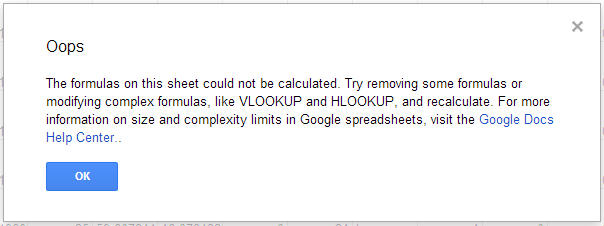
But I'm well far from the declared limits of the application itself:
I've chosen it because it's cross platform, it's easy to share, it's scriptable using javascript with little effort.
Things went fine with all the simple test cases, but when I begun using it with real-life data I came into this:
But I'm well far from the declared limits of the application itself:
Google spreadsheets size and complexity limits
Learn how to keep your spreadsheet up-and-running by avoiding size and complexity limits.
Size limits
If you're close to exceeding Google spreadsheets size limits, you'll see a message at the top of your spreadsheet that indicates what limit you're about to reach.
- Number of cells: 400,000 total cells across all sheets
- Number of columns: 256 columns per sheet
- Number of formulas: 40,000 cells containing formulas across all sheets
- Number of tabs: 200 sheets per workbook
- GoogleFinance formulas: 1,000 GoogleFinance formulas
- ImportRange formulas: 50 cross-workbook reference formulas
- ImportData, ImportHtml, ImportFeed, or ImportXml formulas: 50 functions for external data.
Spreadsheets also have overall storage limits. Some spreadsheets may reach these before hitting the 400,000 cell limit, particularly when individual cells have large amounts of text. In such cases, the spreadsheet will go into read-only mode to prevent data loss.
Google forms size limits
These size limits also impact the spreadsheets that collect form responses (for example, if you send a survey). To determine the number of responses that a form can handle, take the number of questions in your form and the number of cells containing other data into account.
Complex Calculations
Google spreadsheets also have complexity limits. Every time a cell is updated, any cell that references it will also be recalculated. If formulas become too complex or take too long to calculate, the spreadsheet will timeout during calculation.
Formulas that increase the complexity of a spreadsheet include:
- VLOOKUP, QUERY, SUMIF, and many similar formulas that take a large range of cells as input.
- Volatile formulas (e.g., NOW, RAND, OFFSET, INDIRECT) are recalculated every time the spreadsheet is modified. If there are a large number of formulas that depend on cells with volatile formulas, they will be re-calculated on each edit, which may slow down a spreadsheet.
- Import-based formulas (e.g., IMPORTRANGE) are recalculated periodically and magnify complexity.
we're talking about a 4000 rows spreadsheet here, and all the scripts works fine on smaller sheets.
Update:
I investigated a little more: it seems that I hit the 40.000 formulas limit.
Quite a low limit: I had to copy some columns and paste back only the values to go on.
I investigated a little more: it seems that I hit the 40.000 formulas limit.
Quite a low limit: I had to copy some columns and paste back only the values to go on.
2013-09-28
2013-09-22
Multiple Vertical Axes in Google Spreadsheet Charts in Javascript
This was tricky.
Chart options are documented in a wide galaxy of different documents, and none of them seems to explain multiple axes charts:
var ss = SpreadsheetApp.getActiveSpreadsheet();
var sheet = ss.getSheetByName(GlideChartName);
var chart = sheet.newChart()
.setChartType(Charts.ChartType.AREA)
.addRange(sheet.getRange("A:A"))
.addRange(sheet.getRange("B:B"))
.setOption("title", "Chart Name")
.setOption("width", 800)
.setOption("height", 600)
.setOption("hAxis.title", "X")
.setOption("series", { 0: { targetAxisIndex: 0 }, 1: { targetAxisIndex: 1 } })
.setOption("vAxes", { 0: { title: "Y1" }, 1: { title: "Y2" } })
.setPosition(1, 1, 0, 0)
.build();
sheet.insertChart(chart);
Chart options are documented in a wide galaxy of different documents, and none of them seems to explain multiple axes charts:
var ss = SpreadsheetApp.getActiveSpreadsheet();
var sheet = ss.getSheetByName(GlideChartName);
var chart = sheet.newChart()
.setChartType(Charts.ChartType.AREA)
.addRange(sheet.getRange("A:A"))
.addRange(sheet.getRange("B:B"))
.setOption("title", "Chart Name")
.setOption("width", 800)
.setOption("height", 600)
.setOption("hAxis.title", "X")
.setOption("series", { 0: { targetAxisIndex: 0 }, 1: { targetAxisIndex: 1 } })
.setOption("vAxes", { 0: { title: "Y1" }, 1: { title: "Y2" } })
.setPosition(1, 1, 0, 0)
.build();
sheet.insertChart(chart);
2013-09-21
TrickedIn?
What's going on with LinkedIn?
Some weeks ago the list of people I may know began containing a person I really know, but he's completely outside of my working circle.
We don't have any common contacts, he's even living in another country.
I only contacted him last year using the email address I used to register myself on LinkedIn, a yahoo address.
I used yahoo to contact him on gmail, I didn't send any email through LinkedIn nor did him.
Actually I can't think any other mean of relating the two of us other than looking at the history of our mailboxes.
And now this:
http://www.businessweek.com/news/2013-09-20/linkedin-customers-say-company-hacked-their-e-mail-address-books
Maybe 2 clues don't build an evidence, but they leave a doubt.
Some weeks ago the list of people I may know began containing a person I really know, but he's completely outside of my working circle.
We don't have any common contacts, he's even living in another country.
I only contacted him last year using the email address I used to register myself on LinkedIn, a yahoo address.
I used yahoo to contact him on gmail, I didn't send any email through LinkedIn nor did him.
Actually I can't think any other mean of relating the two of us other than looking at the history of our mailboxes.
And now this:
http://www.businessweek.com/news/2013-09-20/linkedin-customers-say-company-hacked-their-e-mail-address-books
Maybe 2 clues don't build an evidence, but they leave a doubt.
2013-09-15
Torque Log Analyzer Tool for Google Drive
NOTE: this post refers to an older version of Torque Log Analyzer.
The new version is here: http://torqueloganalyzer.blogspot.it/
Follow this link.
I leave the older version here for reference.
NOTE: this post has been updated: there is new code attached.
Following up my previous rants on driving gamification, I've made a prototype of a Log Analyzer for Torque, that computes some driving parameters.
It's particularly aimed for Toyota HSD hybrid cars.
It's written in Google Script for Google Drive, so it can be used on as many platforms as possible.
First, you need some logs from Torque: here is a tutorial on that.
The PIDs you need to log are:
"Speed (OBD)(km/h)"
"Engine RPM(rpm)"
"Batt Pack Current Val(Amperes)"
"State of Charge(%)"
These PIDs are contained in a HSD specific file you can find here.
Once you've logged your data with Torque, you should end up with a zip file.
The new version is here: http://torqueloganalyzer.blogspot.it/
Follow this link.
I leave the older version here for reference.
NOTE: this post has been updated: there is new code attached.
Following up my previous rants on driving gamification, I've made a prototype of a Log Analyzer for Torque, that computes some driving parameters.
It's particularly aimed for Toyota HSD hybrid cars.
It's written in Google Script for Google Drive, so it can be used on as many platforms as possible.
First, you need some logs from Torque: here is a tutorial on that.
The PIDs you need to log are:
"Speed (OBD)(km/h)"
"Engine RPM(rpm)"
"Batt Pack Current Val(Amperes)"
"State of Charge(%)"
These PIDs are contained in a HSD specific file you can find here.
Once you've logged your data with Torque, you should end up with a zip file.
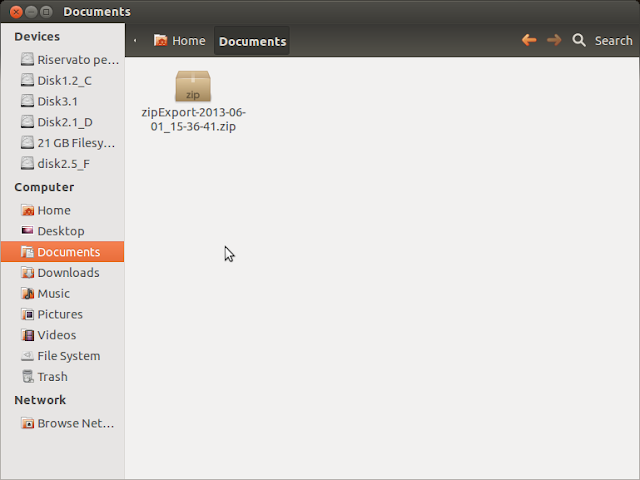
you'll find the actual data inside a CSV file.

extract it.

drag it into google drive, selecting "Convert document"


google drive will convert it to a spreadsheet document.
warning: columns order and name may vary according to your PID logging configuration.
Open the newly created spreadsheet document.

Select "Tool/Script editor..."
Close the wizard window.

Delete any existing code.
Copy and paste the following code:
=== CUT HERE ===
// Torque Log Analyzer for Google Drive
//
// Alessandro Iacopetti, http://pleasedonttouchthescreen.blogspot.it/2013/09/torque-log-analyzer-tool-for-google.html
// free use for non-commercial purposes.
//
// usage:
// load your csv formatted torque log in an empty spreadsheet and then run this script against it
//
// 2013/09/15 - first release
// 2013/09/20 - added some sanity checks, speed variation index, ignitions count
// name of the columns we use
var OBDSpeedName = "Speed (OBD)(km/h)";
var RPMName = "Engine RPM(rpm)";
var BattPackCurrentName = "Batt Pack Current Val(Amperes)";
var SOCName = "State of Charge(%)";
// parameters
var SOCBestValue = 60; // HSD system always tries to maintain this level
var IgnitionMinTime = 5; // seconds under which ICE ignition is considered inefficient
// no user customization under this line
// support columns to be added
var GlideName = "Glide";
var SpeedVarName = "Speed Variation";
// position of columns used in calculation
var OBDSpeed = -1;
var RPM = -1;
var BattPackCurrent = -1;
var SOC = -1;
var Glide = -1;
var SpeedVar = -1;
var NumShortIgnitions = 0;
var NumIgnitions = 0;
function AnalyzeTorqueLogs() {
// logging helpers
function addLogSheet() {
var ss = SpreadsheetApp.getActiveSpreadsheet();
var activesheet = SpreadsheetApp.getActiveSheet();
var sheet = ss.getSheetByName("Log");
if (sheet == null) {
sheet = ss.insertSheet("Log", 1);
}
sheet.setColumnWidth(1, 500);
ss.setActiveSheet(activesheet);
}
function printLog(log) {
var ss = SpreadsheetApp.getActiveSpreadsheet();
var activesheet = SpreadsheetApp.getActiveSheet();
var sheet = ss.getSheetByName("Log");
sheet.appendRow([ log ])
ss.setActiveSheet(activesheet);
}
// data processing
function setDataName() {
var ss = SpreadsheetApp.getActiveSpreadsheet();
var sheet = ss.getSheets()[0];
sheet.setName("Data");
}
// count RPM sequences != 0 less then minimum time
function countShortIgnitions() {
var ss = SpreadsheetApp.getActiveSpreadsheet();
var sheet = ss.getSheets()[0];
var range = sheet.getRange(RPM + "2:" + RPM);
var height = range.getHeight();
var values = range.getValues();
sequencelength = 0;
lastrpm = 0;
for (var i = 0; i < height; ++i) {
if (values[i] != 0) {
sequencelength++;
if (lastrpm == 0)
NumIgnitions++;
}
if (values[i] == 0) {
if (lastrpm != 0) {
if (sequencelength < IgnitionMinTime)
NumShortIgnitions++;
sequencelength = 0;
}
}
lastrpm = values[i];
}
}
function addAnalysisSheet() {
var ss = SpreadsheetApp.getActiveSpreadsheet();
var sheet = ss.getSheetByName("Analysis");
if (sheet == null) {
sheet = ss.insertSheet("Analysis", 1);
}
// SOC
var values = [
[ "Start SOC %" ],
[ "End SOC %" ],
[ "SOC Gain %" ],
[ "Average SOC %" ],
[ "Difference from best %" ],
[ "Standard Deviation" ],
];
var range = sheet.getRange(1, 1, 6, 1);
range.setValues(values);
var values = [
[ "=Data!" + SOC + "2" ],
[ "=INDEX(Data!" + SOC + ":" + SOC + "; COUNT(Data!" + SOC + ":" + SOC + "))" ],
[ "=B2-B1" ],
[ "=AVERAGE(Data!" + SOC + ":" + SOC + ")" ],
[ "=B4-" + SOCBestValue ],
[ "=STDEVP(Data!" + SOC + ":" + SOC + ")" ],
];
var range = sheet.getRange(1, 2, 6, 1);
range.setFormulas(values);
range.setNumberFormat("0.00");
printLog("SOC Analysis added");
// Hybrid
var values = [
[ "ICE off %", "", "Percentage of trip time where the engine was off" ],
[ "Ignitions", "", "Times ICE was turned on" ],
[ "Inefficient Ignitions", "", "Times ICE was turned on for less than " + IgnitionMinTime + " seconds" ],
[ "Glide %", "", "Percentage of driving time where the car was gliding" ],
[ "Longest Glide sequence", "", "Longest glide, in seconds" ],
[ "Battery Stress", "", "Quadratic average of battery current flow" ],
];
var range = sheet.getRange(8, 1, 6, 3);
range.setValues(values);
// formulas are
//=(100*countif(Data!RPM:RPM;0))/count(Data!RPM:RPM)
//=NumIgnitions
//=NumShortIgnitions
//=sum(Data!GLIDE:GLIDE)/countif(Data!SPEED:SPEED, ">0")*100
//=arrayformula(MAX(FREQUENCY(IF(Data!GLIDE:GLIDE=1,ROW(Data!GLIDE:GLIDE)),IF(Data!GLIDE:GLIDE<>1,ROW(Data!GLIDE:GLIDE)))))
//=sqrt(sumsq(Data!BATTERY:BATTERY)/count(Data!BATTERY:BATTERY))
countShortIgnitions();
var values = [
[ "=(100*countif(Data!" + RPM + ":" + RPM + ";0))/count(Data!" + RPM + ":" + RPM + ")" ],
[ NumIgnitions ],
[ NumShortIgnitions ],
[ "=sum(Data!" + Glide + ":" + Glide + ")/countif(Data!" + OBDSpeed + ":" + OBDSpeed + "; \">0\")*100" ],
[ "=arrayformula(MAX(FREQUENCY(IF(Data!" + Glide + ":" + Glide + "=1;ROW(Data!" + Glide + ":" + Glide + "));IF(Data!" + Glide + ":" + Glide + "<>1;ROW(Data!" + Glide + ":" + Glide + ")))))" ],
[ "=sqrt(sumsq(Data!" + BattPackCurrent + ":" + BattPackCurrent + ")/count(Data!" + BattPackCurrent + ":" + BattPackCurrent + "))" ],
];
var range = sheet.getRange(8, 2, 6, 1);
range.setFormulas(values);
range.setNumberFormat("0.00");
printLog("Hybrid Analysis added");
var values = [
[ "Average Speed", "", "Km/h" ],
[ "Top Speed", "", "Km/h" ],
[ "Average Absolute Variation", "", "Speed variations during the trip (only while moving): measure your driving style" ],
];
var range = sheet.getRange(15, 1, 3, 3);
range.setValues(values);
// formulas are
//=AVERAGE(Data!SPEED:SPEED)
//=Max(Data!SPEED:SPEED)
//=sqrt(sumsq(Data!SPEEDVAR:SPEEDVAR)/countif(Data!SPEED:SPEED, ">0"))
var values = [
[ "=AVERAGE(Data!" + OBDSpeed + ":" + OBDSpeed + ")" ],
[ "=Max(Data!" + OBDSpeed + ":" + OBDSpeed + ")" ],
[ "=sqrt(sumsq(Data!" + SpeedVar + ":" + SpeedVar + ")/countif(Data!" + OBDSpeed + ":" + OBDSpeed + "; \">0\"))" ],
];
var range = sheet.getRange(15, 2, 3, 1);
range.setFormulas(values);
range.setNumberFormat("0.00");
sheet.autoResizeColumn(1);
sheet.autoResizeColumn(2);
sheet.autoResizeColumn(3);
printLog("Analysis sheet added");
}
function insertSeparatorColumn() {
var alreadyexist = findColumnByName("|");
if (alreadyexist != -1) {
return;
}
var ss = SpreadsheetApp.getActiveSpreadsheet();
var sheet = ss.getSheetByName("Data");
var last = sheet.getLastColumn();
sheet.insertColumnAfter(last);
var cell = sheet.getRange(1, last + 1);
cell.setValue("|");
var rangeToCopy = sheet.getRange(1, last + 1, 1, 1);
rangeToCopy.copyTo(sheet.getRange(2, last + 1, sheet.getLastRow() - 1, 1));
sheet.autoResizeColumn(1);
printLog("separator column added");
}
function insertSpeedVarColumn() {
SpeedVar = findColumnByName(SpeedVarName);
if (SpeedVar != -1) {
return;
}
var ss = SpreadsheetApp.getActiveSpreadsheet();
var sheet = ss.getSheetByName("Data");
var last = sheet.getLastColumn();
sheet.insertColumnAfter(last);
// first 2 cells are constant
var values = [
[ SpeedVarName ],
[ "0" ],
];
var range = sheet.getRange(1, last + 1, 2, 1);
range.setValues(values);
// formula is "=SPEED3-SPEED2"
var cell = sheet.getRange(3, last + 1);
cell.setFormula("=" + OBDSpeed + "3-" + OBDSpeed + "2");
var rangeToCopy = sheet.getRange(3, last + 1, 1, 1);
rangeToCopy.copyTo(sheet.getRange(3, last + 1, sheet.getLastRow() - 2, 1));
SpeedVar = findColumnByName(SpeedVarName);
printLog("speed variation column added");
}
function insertGlideColumn() {
Glide = findColumnByName(GlideName);
if (Glide != -1) {
return;
}
var ss = SpreadsheetApp.getActiveSpreadsheet();
var sheet = ss.getSheetByName("Data");
var last = sheet.getLastColumn();
sheet.insertColumnAfter(last);
var range = sheet.getRange(1, last + 1, 1, 1);
range.setValue(GlideName);
// formula is "=if(and(RPM2<500;SPEED2>10;abs(BATTPACKCURRENT2)<5);1;0)"
var cell = sheet.getRange(2, last + 1);
cell.setFormula("=if(and(" + RPM + "2<500;" + OBDSpeed + "2>10;abs(" + BattPackCurrent + "2)<5);1;0)");
var rangeToCopy = sheet.getRange(2, last + 1, 1, 1);
rangeToCopy.copyTo(sheet.getRange(2, last + 1, sheet.getLastRow() - 1, 1));
Glide = findColumnByName(GlideName);
printLog("glide column added");
}
function activateSheetByName(name) {
var ss = SpreadsheetApp.getActiveSpreadsheet();
var sheet = ss.getSheetByName(name);
ss.setActiveSheet(sheet);
}
// returns only letter of the column with the given name in the first cell
function findColumnByName(name) {
var ss = SpreadsheetApp.getActiveSpreadsheet();
var sheet = ss.getSheetByName("Data");
var last = sheet.getLastColumn();
var foundcolumn = -1;
for (var i = 1; i <= last; i++) {
var cell = sheet.getRange(1, i);
var value = cell.getValue();
if (value == name) {
foundcolumn = cell.getA1Notation();
printLog("Found column " + name + " at " + foundcolumn);
}
}
if (foundcolumn == -1) {
printLog("Column " + name + " not found");
}
else {
foundcolumn = foundcolumn.substring(0, foundcolumn.length - 1);
}
return foundcolumn;
}
// set "-" to "0" and check if there are values > max
function sanitizeColumn(column, max) {
var ss = SpreadsheetApp.getActiveSpreadsheet();
var sheet = ss.getSheets()[0];
var range = sheet.getRange(column + ":" + column );
var height = range.getHeight();
var values = range.getValues();
var foundnull = false;
printLog("checking " + height + " values at column " + column);
for (var i = 0; i < height; ++i) {
if (values[i] == "-") {
var cell = range.getCell(i + 1, 1);
cell.setValue(0);
foundnull = true;
}
if (values[i] > max) {
printLog("ERROR: Values in column " + column + " out of range, check for import errors");
}
}
if (foundnull)
printLog("some missing values in column " + column);
}
// set global vars to columns position
function findNeededColumns() {
OBDSpeed = findColumnByName(OBDSpeedName);
RPM = findColumnByName(RPMName);
BattPackCurrent = findColumnByName(BattPackCurrentName);
SOC = findColumnByName(SOCName);
}
function sanitizeNeededColumns() {
sanitizeColumn(OBDSpeed, 300);
sanitizeColumn(RPM, 10000);
sanitizeColumn(BattPackCurrent, 300);
sanitizeColumn(SOC, 100);
}
// main
addLogSheet();
printLog("Begin data processing");
setDataName();
activateSheetByName("Data");
findNeededColumns();
sanitizeNeededColumns();
insertSeparatorColumn();
if (OBDSpeed != -1) {
insertSpeedVarColumn();
}
else {
printLog("ERROR: Could not add speed variance column");
}
if ((OBDSpeed != -1) && (RPM != -1) && (BattPackCurrent != -1)) {
insertGlideColumn();
}
else {
printLog("ERROR: Could not add glide column");
}
addAnalysisSheet();
printLog("End data processing");
}
=== CUT HERE ===

Now select "File / Save" and then "Run / AnalyzeTorqueLogs"
You will have to authorize the script


After the script has finished running, switch back to the spreadsheet, and you'll see a new tab named "Analysis".

This first version compute some sample parameters regarding the HV battery:
start and end charge, and average value vs the value considered the best by some hypermilers (60%).
There are some other values that may answer some curiosity about the car inner working:
the percentage of the time the petrol engine was actually off during the trip,
the percentage of time the car was moving using very little energy (glide),
the longest glide time of the trip
a battery "stress" value, that evaluates how may amperes have flown in and out of the battery: a higher value means higher stress, but a meaningful range has yet to be established.
NOTE:
This new version add some parameters:
how many times ICE was turned on during the trip
how many ICE ignitions lasted less than 5 seconds (those are considered just a waste of fuel)
an evaluation of speed variance during the trip: this should give an idea of your driving stile (calm or aggressive).
| Ignitions | 13.00 | Times ICE was turned on |
| Inefficient Ignitions | 1.00 | Times ICE was turned on for less than 5 seconds |
| Average Speed | 41.08 | |
| Top Speed | 77.00 | |
| Average Absolute Variation | 1.97 | Speed variations during the trip (only while moving) |
Subscribe to:
Posts (Atom)